
|
PCDVD數位科技討論區
(https://www.pcdvd.com.tw/index.php)
- 系統組件
(https://www.pcdvd.com.tw/forumdisplay.php?f=19)
- - IntelliPoint 6.3看不到無線滑鼠的剩餘電量?
(https://www.pcdvd.com.tw/showthread.php?t=846998)
|
|---|
IntelliPoint 6.3看不到無線滑鼠的剩餘電量?
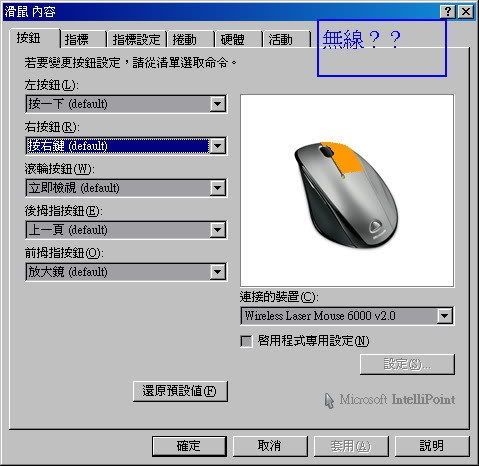 如圖,少了無線的那個選項,所以看不到電量、訊號強弱的訊息 不過IntelliType 6.3就沒這個問題,請問有辦法解決嗎? |
引用:
有一定理由要延用 IntelliPoint 6.3嗎? |
我現在就是用IP6.3,沒你說的問題...
試著把滑鼠拔掉後重新安裝driver看看。 |
嗯~~~
我的是Sidewinder X8 IP 6.3也是一樣沒有那個項目 |
那是依照滑鼠型號決定的,較新型號的取消了電量跟
訊號強弱顯示功能。我的Wireless Notebook laser mouse 7000 也是沒有,換上另一隻3000型的就有! 我覺得理由很簡單,滑鼠身上有電量指示燈,至於訊號強弱 可能MS覺得你自己用的順不順就知道訊號強弱了 :shock: |
我換新版是想看看問題修正了沒,結果還是沒有....如圖
  |
有人看的懂我貼的圖的問題嗎?
我在一個英文論壇看到有人貼修正方法,但我試了後無效... 大家都沒遇過這問題?我從一開始用這組產品就遇到了.... 以下是修正方法的原文: FIX Flickering Due to Microsoft Intellipoint Software (ipoint.exe) tl_woods - 09:23am Mar 7, 2008 Pacific I have had video problems due to this mouse driver for about a year now and I finally found a solution I thought I would share with everyone. I had issues with after effects CS2 and 3dsmax 9. It caused graphical artifacting and flickering intermitantly on screen. Mostly when I use the dropdown menus and rendering in 3dsmax. Do some searching... this is a wide spread problem with few solutions out there. Most of the solutions say to just disable the ipoint.exe driver to fix this, but you might as well uninstall the software if you are disabling the ipoint.exe driver because you cant use the functionality of the software. I love the intellipoint drivers because you can program the mouse buttons to perform multiple actions in every program used This is very helpful for CG work. It would be nice in Microsoft would get off there ass and fix this issue, but here is a solution that worked for me. I am using Windows Xp 64 and updated Nvidea Geforce drivers. This is not an issue with Windows XP 64. I dont think the type of video card you have matters either because I have read multiple postings with references to ipoint.exe problems with many different video cards and different versions of Windows including the XP 32 bit version. This is what I did to fix this. Uninstall all microsoft intellimouse driver versions. Export your registry settings and then search in registry for intellimouse and delete all references. I dont think this is necessary but thats what I did. |
| 所有的時間均為GMT +8。 現在的時間是06:00 AM. |
vBulletin Version 3.0.1
powered_by_vbulletin 2026。